
If you want to improve your website's visibility on Google, then... Google Search Console It's an essential tool. With it, you can track your website's performance, fix technical problems, and optimize your SEO strategy. Plus, it's free and easy to use.
In this article, we will explore What is Google Search Console?, how to use it e What strategies can improve your online presence?. Keep reading to understand why this tool is indispensable for any website.
What is Google Search Console?
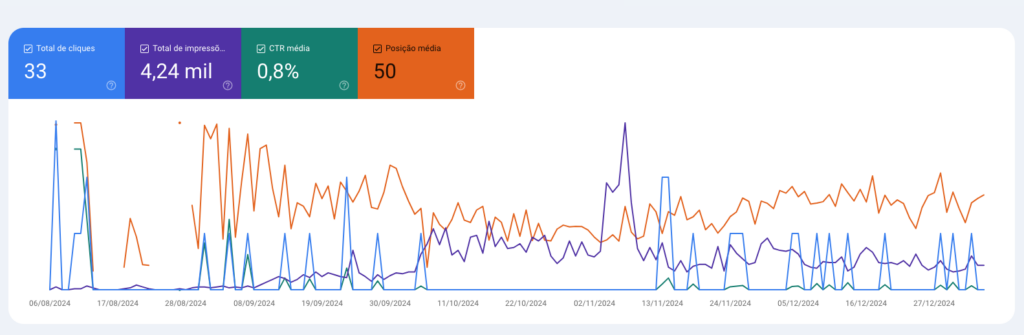
O Google Search Console (GSC) It's a free Google tool designed to help website owners monitor their presence in search results. With it, you can identify... what is working well, what needs adjusting e How to improve your Google ranking.
Furthermore, it allows you to analyze important metrics, such as:
- Keywords that generate traffic to the website
- Most visited pages in search results
- Errors that prevent your website from being indexed correctly.
- Backlinks and internal links that influence your SEO.
Therefore, if you want your website to perform well in search engines, the Google Search Console is essential..
Main Features of Google Search Console
Now that you know what GSC is, let's understand... What are its main features? and how to use them to improve your website.
1. Performance Report
With the performance report, you can view which keywords They drive users to your website. In addition, it shows... impressions, clicks, CTR (click-through rate) e average position on Google.
This way, you can identify optimization opportunities, How to improve titles and descriptions to increase your click-through rate.
2. Page Indexing
Not all pages on your website appear on Google. However, with Search Console, you can check. How many pages are indexed? and to resolve problems that prevent correct indexing.
Therefore, it is essential to frequently review this report and correct any errors found.
3. Sitemap Submission
If you want Google to find all your pages quickly, then submit a XML sitemap It's essential. In Search Console, you can submit the sitemap and ensure that Google crawls and indexes all pages on your website.
4. Page Experience Report
User experience is one of the most important factors for SEO. That's why Google Search Console offers a report that evaluates... loading speed, mobile usability e Core Web Vitals.
If your website is slow or has usability issues, then it's essential to fix these points to improve your ranking.
5. Internal Links and Backlinks
Links are fundamental for SEO. In Search Console, you can view them. Which pages on your website receive the most internal links? e Which external websites are linking to you? (backlinks).
If a quality link is removed or if there are broken links, you can quickly fix them to avoid impacting your ranking.
How do I set up Google Search Console?

Now that you are familiar with GSC's features, let's go through the step-by-step process to configure it correctly.
1. Access the Google Search Console.
First, access the official Google Search Console website through... official link.
2. Add your website.
Next, click on “Add Property” and enter your website's URL.
3. Verify the Property
Google offers different verification methods, such as:
- Insert HTML code into your website.
- Send an HTML file to the server.
- Connect via Google Analytics or Google Tag Manager.
Choose the most convenient method and complete the verification.
4. Submit the Sitemap
After verification, go to the “Sitemaps” tab and submit your URL. sitemap.xml. This will ensure that Google crawls all your pages correctly.
5. Analyze the Reports
Finally, access your Search Console reports regularly to keep track. performance, indexing, links and errors.
Advanced Tips to Improve Your SEO with Google Search Console
Now that your website is set up on GSC, here are some strategies to further optimize your SEO:
1. Optimize pages with low click-through rates (CTR).
If a page has many impressions, but just a few clicks, This means that the title or meta description needs adjustments.
Try including long-tail keywords, Use calls to action and emojis (if it makes sense) to make your titles more appealing.
2. Correct Tracking Errors
Search Console notifies you of errors that prevent Google from accessing your pages. Therefore, review the reports frequently and correct problems such as:
- 404 Error (page not found)
- Blocks in robots.txt
- Server errors
3. Follow the Core Web Vitals Report
Google considers the loading speed a ranking factor. If your pages are slow, then optimize images, reduce unnecessary scripts, and use a CDN to improve performance.
Google Search Console
O Google Search Console It's an essential tool for any website that wants to grow on Google. Besides providing detailed reports, it helps to... identify problems, optimize pages e improve SEO.
Therefore, if you are not already using GSC, start now and take advantage of all the benefits of this powerful tool.
If you need help setting up and interpreting the reports, Thigor Agency can help.. Contact us and take your website to the top of Google!



 Portuguese
  Italian
  English